Item values on hover
Lowest BIN, Bazaar buy and sell, estimated value and raw craft cost in every tooltip. Counts pet level, held item, gemstones, enchants and upgrades.
 GlassSky
Download
Minecraft 26.2 · Fabric · Hypixel SkyBlock
GlassSky is a free launcher and client built for SkyBlock. Every ender chest page, backpack, wardrobe slot and pet at once, searchable, with live item values, in a liquid glass look.


Built in
GlassSky replaces Hypixel's menus with glass panels you can search, and keeps a cached copy so you can look at your stuff anywhere.
All your ender chest pages in one screen, with a search bar that lights up matching items in your backpacks too.
Lowest BIN, Bazaar buy and sell, estimated value and raw craft cost in every tooltip. Counts pet level, held item, gemstones, enchants and upgrades.
Your next cheapest missing talisman upgrades, sorted from cheapest to most expensive, with the Magical Power each one adds.
Tabs for Skills, Collections, Pets, Armor Sets, Sacks and Accessories stay on screen so you can jump between them.
Every SkyBlock recipe from the NEU repo. Right-click an ingredient to open it on the Bazaar or Auction House.
Type /glasshelp for a step-by-step upgrade plan for your profile, powered by your stats.
OptiFine-style zoom with scroll, always sprint, waypoints with a guide line, and cosmetics from Cosmetica.
New in v0.9.9
Ringtones and notification sounds, eight GlassSky ranks earned from your whole SkyBlock profile, a leaderboard, Looking for Group, and Messages on the website. Already installed? The launcher updates itself the next time you open it.
Incoming calls now ring until you pick up, and a chime lets you know when someone adds you, messages you, or a mod you use gets an update. Turn them on or off and set the volume in Messages settings. The new bell in the top right keeps every notification so you can catch up later.
Earn a rank from Rookie to Mythic with your skills, collections, net worth, museum, pets, dungeons, slayers, magical power, minions, fishing and mining. Other GlassSky players see your spinning 3D rank logo next to your name in SkyBlock. Top score is 8,000.
See where you stand on the GlassSky leaderboard, in the launcher under Home or here on the website. Open any player to see how their score breaks down.
List yourself for dungeons, Kuudra, dragons, slayers and more, see who else is looking, then message, add or call them straight from the board.
Make a website account, link your Minecraft account with a code from the launcher, and your friends and chats come with you. Text, voice and video calls work in your browser.
Press the phone or camera button in a chat to call a friend. Calls go straight between your two computers. Pick your mic, camera and speaker, set mic and call volume, noise suppression, echo cancellation, video quality and frame rate in call settings. Shrink the call and keep chatting.
Browse thousands of emotes from emotes.redlance.org on the new Emotes page and add them with one click. Press B in game for the emote wheel. Every GlassSky player sees you dance.
Your inventory sits in the middle with your ender chest pages around it. Make the pages bigger or smaller with the size control in the top-left, or switch back to the side layout. Skyblocker's tabs no longer show through behind it.
See your magical power, and only the accessories you don't have or the next upgrade of ones you do. Ctrl+click any suggestion to open it on the Hypixel wiki.
Add friends by Minecraft username and chat from the launcher or the in-game Messages tab. Direct messages are free; group chats are Premium. Your cosmetics are visible to other GlassSky players.
Set the pitch, tilt and distance of your cape, wings, hat, back item or pet so armor never covers them. Change it in the launcher with a live 3D preview, or in game. Free players wear one cosmetic at a time, and Premium players can wear them all.
Also in 0.9: SkyHanni, Skyblocker, Odin and Seymour Analyzer built in with one Right Shift menu for all their settings, /pv profile viewer, backpack viewer, party, guild and private chat on T, E works with Skyblocker and SkyHanni, and automatic updates that keep your settings.
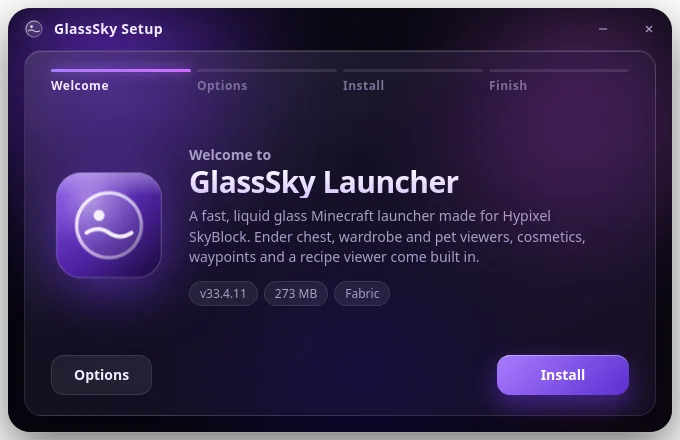
Setup
Run the setup, sign in with Microsoft, and you are in. It installs Java, Fabric and every mod for you, can pin itself to your taskbar, and keeps itself up to date.
Windows 10 or 11 · 64-bit · Minecraft Java account
Support
Questions, bugs, or Premium perks: join the server or message directly.
FAQ
Yes. The launcher, the client and every feature on this page are free. Premium is optional.
GlassSky only changes how menus and tooltips look and reads prices from public APIs. It does not automate gameplay. Always follow Hypixel's rules on allowed modifications.
The installer is not code-signed yet, so SmartScreen may warn you. Click "More info" and then "Run anyway".
Each time you open the launcher it checks this website. If there is a new version you will see "Updating GlassSky" for a moment, then it opens on the new version. You can turn this off in Settings > About. If you are on 0.8 or older, download the setup once more to get automatic updates.
No. Your settings, Microsoft accounts, instances, worlds, mods and skins are stored separately from the program and are kept through every update.
Yes. The setup installs everything it needs on any Windows PC, and your friend signs in with their own Microsoft account.
After checkout you land on a page with your Premium key (GSKY-XXXXX-XXXXX-XXXXX-XXXXX). Copy it, open the launcher, go to Settings › Premium › Unlock Premium, paste it and press Activate. Then set your custom name, its color, your SkyBlock level color and the badge. Lost the page? Open a ticket in the Discord with your Square receipt.
GlassSky
Download free